Shereen Ahmed 🍓
Aspiring Product Manager
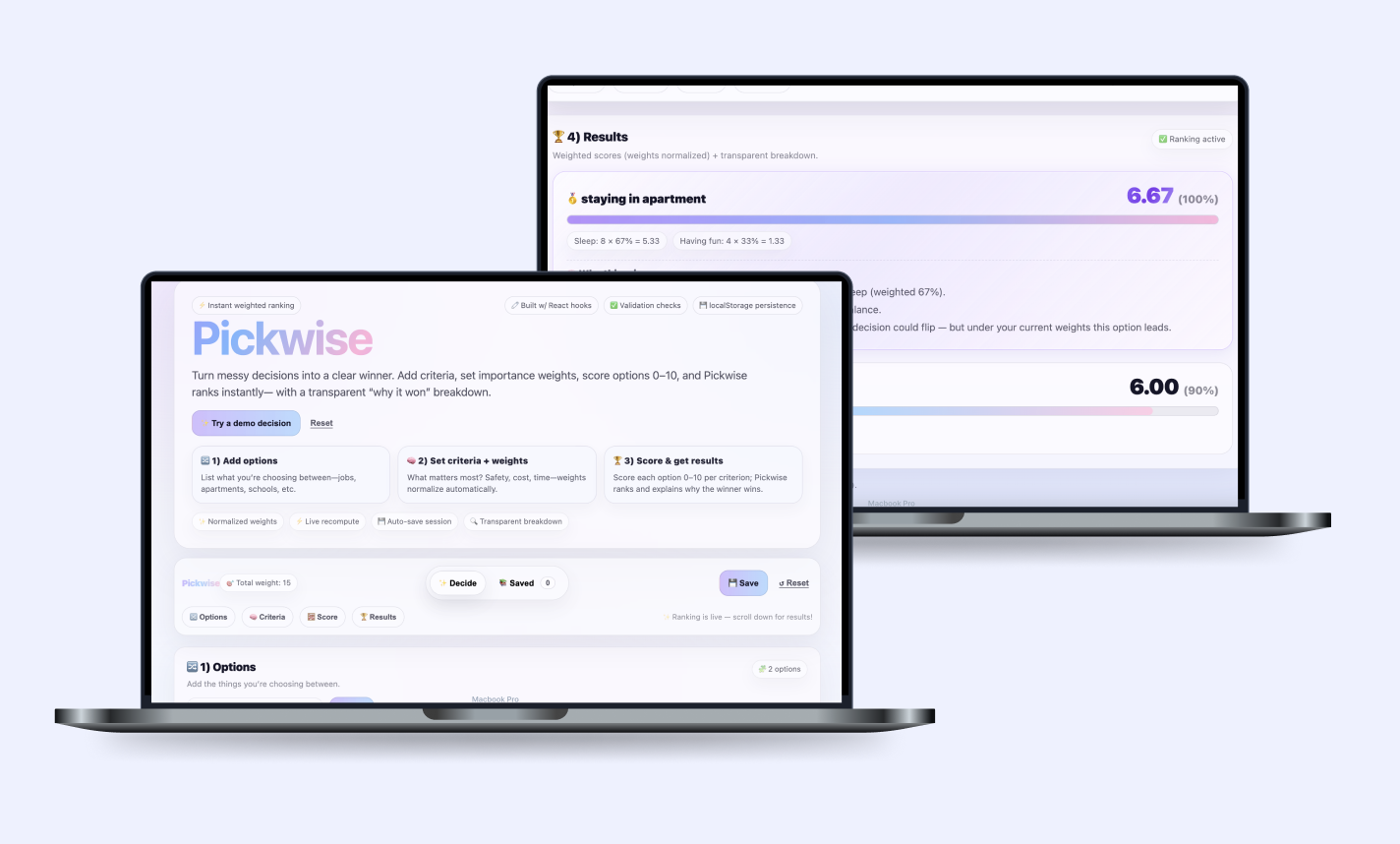
Pickwise hero mockup
Decision intelligence · Product build

Pickwise

A decision-support web app I built to help users turn messy choices into a more structured, transparent, and explainable process through weighted scoring, live ranking, and persistent decision history.

Role

Product Builder

PM

Software Engineer

Timeline

February 2026 – Ongoing

Focus

Structured decision-making

Explainable ranking

Technical product thinking

Stack

React

JavaScript

localStorage

Overview

The Product

Pickwise helps users compare options using a weighted decision framework. Users can add the choices they are deciding between, define what criteria matter most, assign weights to those criteria, and score each option from 0–10. The app then calculates a ranked result and provides a breakdown of why the top choice leads.

I built this project to explore the overlap between product thinking and engineering. I wanted to create something that felt intuitive from a user standpoint, but also grounded in clear logic and explainability.

Problem

Goal

Product Thinking

Why Pickwise

I wanted to build something that bridged product strategy and engineering. Many tools either lean too heavily on intuition or too heavily on black-box automation. Pickwise starts with a deterministic scoring system so users can stay in control, understand what matters most, and make decisions with more confidence.

The broader vision is to create a hybrid decision product: one that begins with structured logic and later incorporates AI-assisted reasoning without sacrificing transparency.

Experience Flow

How the Product Works

1. Add options

Users enter the choices they are deciding between, such as jobs, apartments, routes, or schools.

2. Define criteria

Users choose the factors that matter most to them, such as cost, quality, time, or safety.

3. Set weights + scores

Each criterion receives an importance weight, and each option receives a score from 0–10.

4. View ranked results

The app computes weighted totals and explains why the top option wins.

Architecture

Core Technical Decisions

State Management

I used React hooks to manage dynamic state across criteria, options, scores, notes, and decision history.

Persistent Storage

I used localStorage so the active decision and saved history could persist between sessions without needing a backend.

Explainable Ranking

I built a weighted scoring system that normalizes importance weights, recomputes live, and exposes each factor’s contribution.

Users enter options, criteria, and importance weights. This defines the raw decision space Pickwise needs to reason about.

Code Highlights

Important Snippets from the App

Since Pickwise was something I coded myself, I wanted the case study to show not just the interface, but the technical thinking that shaped the product. These snippets highlight the parts of the app that were most important to resilience, logic, and explainability.

1) Safe local persistence
function safeLoadCurrent() {
  const raw = localStorage.getItem(STORAGE_KEY);
  if (!raw) return null;
  const parsed = safeJsonParse(raw);
  if (
    !parsed ||
    !Array.isArray(parsed.criteria) ||
    !Array.isArray(parsed.options) ||
    typeof parsed.scores !== "object"
  ) {
    return null;
  }
  return parsed;
}
I added a guarded loader so malformed or corrupted browser data would not break the app. This made the product more resilient and protected the user experience.
2) Auto-saving state with React hooks
useEffect(() => {
  localStorage.setItem(
    STORAGE_KEY,
    JSON.stringify({ criteria, options, scores, optionNotes })
  );
}, [criteria, options, scores, optionNotes]);

useEffect(() => {
  localStorage.setItem(HISTORY_KEY, JSON.stringify(history));
}, [history]);
This let Pickwise continuously save user input in the background. From a product perspective, that reduced friction because users did not need an account or manual save flow to preserve progress.
3) Weighted decision logic
const breakdownForOption = (optionId) => {
  if (!hasEnoughToRank) return [];
  return criteria.map((c) => {
    const w = Number(c.weight);
    const weightShare = totalWeight > 0 ? w / totalWeight : 0;
    const rawScore = scores[optionId]?.[c.id];
    const scoreNum =
      typeof rawScore === "number" ? rawScore : Number(rawScore) || 0;
    const contribution = scoreNum * weightShare;

    return {
      criterionId: c.id,
      name: normalizeName(c.name) || "(unnamed)",
      weightShare,
      score: scoreNum,
      contribution,
    };
  });
};
This is the core scoring engine. Instead of relying on raw inputs alone, the app converts each criterion into a normalized share of the total and calculates how much each one contributes to the final score.
4) Live ranked results
const ranked = useMemo(() => {
  return [...options]
    .map((o) => ({ ...o, total: totalForOption(o.id) }))
    .sort((a, b) => (b.total ?? -Infinity) - (a.total ?? -Infinity));
}, [options, criteria, scores, totalWeight]);
I used useMemo so rankings would update efficiently as users changed inputs, while keeping the experience fast and responsive.
5) Explainability layer
lines.push(
  `${winnerName} wins because its biggest strength is ${primary.name} (weighted ${Math.round(
    (primary.weightShare || 0) * 100
  )}%).`
);

if (secondary) {
  lines.push(
    `It also scores well on ${secondary.name}, giving it a strong overall balance.`
  );
}
One of my favorite product decisions was making the output feel interpretable, not just numerical. This explanation layer helps users understand why the winning option leads.
Pickwise code or UI visual

Product + Engineering

What I Learned While Building It

Technical Growth
  • How to manage dynamic state across multiple related inputs
  • How to persist meaningful user data without backend infrastructure
  • How to design product logic that stays explainable
  • How UX trust improves when users can see why an output happened
PM Lens

Pickwise was not just a coding exercise. It was a product exercise in reducing ambiguity, designing for trust, and translating a messy mental process into a clearer workflow.

Building it myself helped me understand how product strategy, user experience, and technical implementation continuously shape each other.

Roadmap

Future LLM Reasoning Layer

The next iteration of Pickwise introduces an LLM-powered qualitative layer. While the current app produces deterministic rankings, the future version will synthesize user-entered pros, risks, notes, and intuition into a more structured recommendation summary.

Planned AI Features

1. Tradeoff Summaries
  • Summarize the biggest strengths and weaknesses across options
  • Help users understand tradeoffs beyond raw numeric scores
  • Add qualitative context to structured rankings
LLM summary concept
2. Risk Detection
  • Detect recurring uncertainty themes in user-entered notes
  • Highlight emotional hesitation or repeated concerns
  • Make the decision process more reflective and nuanced
Risk detection concept
3. Human-Centered AI
  • Preserve transparency by augmenting rather than replacing the scoring engine
  • Use AI to support reasoning, not make opaque decisions for the user
  • Keep the product grounded in trust and explainability
Human-centered AI concept

Live Demo

See the Product in Action

I wanted the case study to end with the product itself, so viewers can move from the strategy and code directly into the experience.

Takeaway

What This Project Shows

  1. Good product logic should feel understandable. Users trust systems more when they can see why an outcome happened instead of only receiving a score.
  2. Technical implementation shapes product quality. Persistence, validation, and performance decisions all influenced how trustworthy and usable Pickwise felt.
  3. AI works best when paired with structure. Pickwise reinforced my interest in products that combine deterministic systems with AI-assisted reasoning in a way that stays human-centered.

See Other Projects

More work you can explore

A few other projects that show how I design across community engagement, decision support, and product thinking.

Mobile + Admin

United Way

Designed a volunteer discovery and admin management experience that helps nonprofits organize events more clearly.

View project →
Mental Wellness

Rose Garden

Designed a softer journaling and reflection experience that makes emotional check-ins feel calm, rewarding, and intentional.

View project →
Me!

Learn more about me!

Learn more about who I am and what brought me into Product Management!

About! →